Mixed Precision Training

Modern GPUs have specialized hardware (tensor cores) that compute with half-precision floats (FP16/BF16) at 2x the speed of full precision (FP32). Mixed precision training uses this for a nearly free speedup.

This notebook covers: 1. Float formats — FP32 vs FP16 vs BF16: range, precision, and tradeoffs 2. Why “mixed”? — some operations need FP32 for numerical stability 3. Loss scaling — preventing gradient underflow in FP16 4. BF16 is simpler — same range as FP32, so no loss scaling needed 5. Hands-on comparison — train with FP32 vs BF16 and measure the difference

References

Tip📺 Video companion

Let’s reproduce GPT-2 (Karpathy) demonstrates BF16 mixed precision and its speedup live on an A100 — more in Videos.

Note🎯 Goal

Understand FP16/BF16 training: range vs precision, loss scaling, and where the ~2x speedup comes from.

🏗️ Chapter milestone: M6 — measure your model’s precision speedup — the exercise at the end of this chapter; see The Project.

Tip⏱️ Session S2.5

One session, ending in 🏗️ M6 — measure your model’s precision speedup. Cards, prerequisites, and done-when tests: the Session Guide.

Open in Colab

Setup
# Setup — works from a repo checkout (via ../src) or standalone on Colab
import sys
sys.path.insert(0, '../src')
try:
    import ai_playground  # noqa: F401
except ImportError:
    %pip install -q git+https://github.com/ggreg/ai_playground.git

%config InlineBackend.figure_format = 'retina'
from ai_playground.plotting import apply_plot_style
apply_plot_style()
Code
import sys
sys.path.insert(0, '../src')

import torch
import torch.nn as nn
import torch.nn.functional as F
import matplotlib.pyplot as plt
import matplotlib.patches as mpatches
import numpy as np
import struct

torch.manual_seed(42)
<torch._C.Generator at 0x10b54af50>

1. Float Formats: FP32, FP16, BF16

A floating point number is stored as: (-1)^sign × 2^exponent × mantissa

Format Bits Exponent Mantissa Range Precision
FP32 32 8 bits 23 bits ±3.4×10³⁸ ~7 decimal digits
FP16 16 5 bits 10 bits ±65504 ~3 decimal digits
BF16 16 8 bits 7 bits ±3.4×10³⁸ ~2 decimal digits

Key insight: BF16 has the same exponent (range) as FP32 but less precision. FP16 has better precision but much smaller range — gradients can underflow to zero.

Show plotting code
# Visualize the bit layout of each format
fig, axes = plt.subplots(3, 1, figsize=(14, 5))

formats = [
    ('FP32 (32 bits)', 1, 8, 23, '#94A3B8'),
    ('FP16 (16 bits)', 1, 5, 10, '#FF6B6B'),
    ('BF16 (16 bits)', 1, 8, 7, '#4ECDC4'),
]

for ax, (name, sign_bits, exp_bits, mant_bits, color) in zip(axes, formats):
    total = sign_bits + exp_bits + mant_bits
    x = 0

    # Sign bit
    rect = mpatches.FancyBboxPatch((x, 0), sign_bits, 1, boxstyle='round,pad=0.02',
                                    facecolor='#C4B5FD', edgecolor='#333')
    ax.add_patch(rect)
    ax.text(x + sign_bits/2, 0.5, 'S', ha='center', va='center', fontweight='bold', fontsize=10)
    x += sign_bits

    # Exponent
    rect = mpatches.FancyBboxPatch((x, 0), exp_bits, 1, boxstyle='round,pad=0.02',
                                    facecolor='#FFE66D', edgecolor='#333')
    ax.add_patch(rect)
    ax.text(x + exp_bits/2, 0.5, f'Exponent ({exp_bits} bits)', ha='center', va='center',
            fontweight='bold', fontsize=10)
    x += exp_bits

    # Mantissa
    rect = mpatches.FancyBboxPatch((x, 0), mant_bits, 1, boxstyle='round,pad=0.02',
                                    facecolor=color, edgecolor='#333')
    ax.add_patch(rect)
    ax.text(x + mant_bits/2, 0.5, f'Mantissa ({mant_bits} bits)', ha='center', va='center',
            fontweight='bold', fontsize=10)

    ax.set_xlim(-0.5, 32.5)
    ax.set_ylim(-0.2, 1.5)
    ax.set_ylabel(name, fontsize=11, fontweight='bold')
    ax.set_xticks([])
    ax.set_yticks([])
    ax.spines['top'].set_visible(False)
    ax.spines['right'].set_visible(False)
    ax.spines['bottom'].set_visible(False)
    ax.spines['left'].set_visible(False)

axes[0].set_title('Floating Point Bit Layouts', fontsize=14, fontweight='bold', pad=10)
plt.tight_layout()
plt.show()

print('Key: more exponent bits = larger range, more mantissa bits = more precision')
print('BF16 has FP32\'s range (8-bit exponent) but coarser precision (7-bit mantissa)')

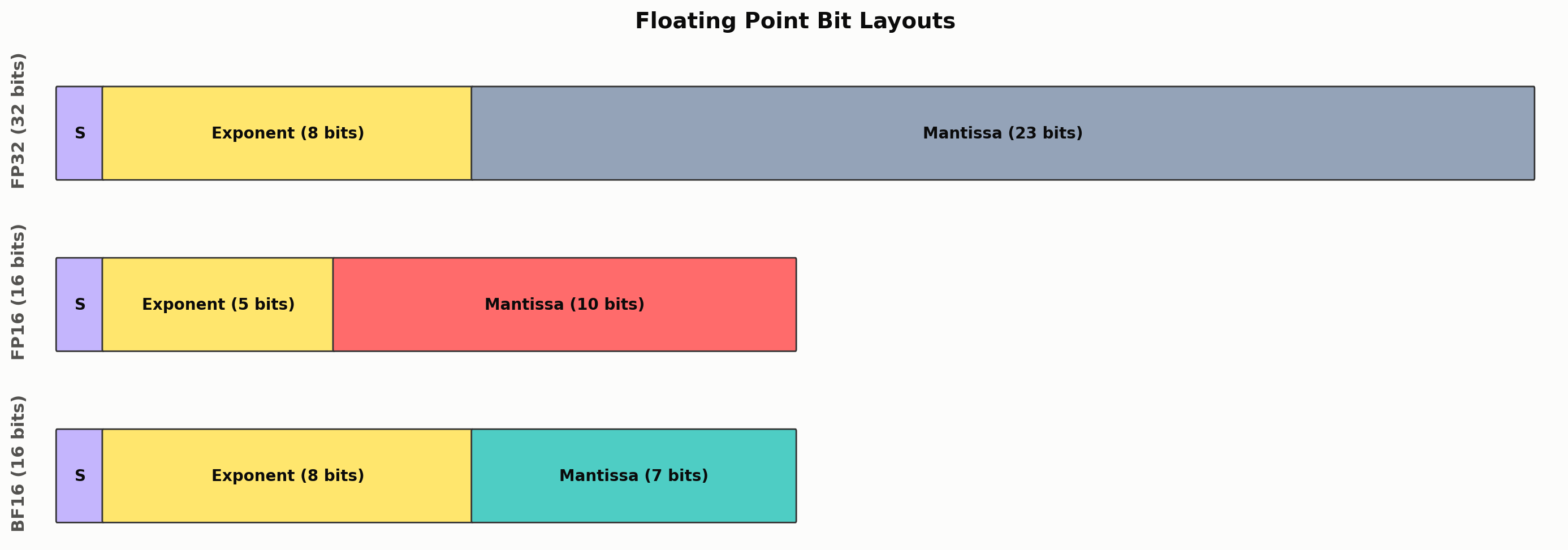
Key: more exponent bits = larger range, more mantissa bits = more precision
BF16 has FP32's range (8-bit exponent) but coarser precision (7-bit mantissa)
Code
# Demonstrate the practical differences
print('=== Range comparison ===')
for name, dtype in [('FP32', torch.float32), ('FP16', torch.float16), ('BF16', torch.bfloat16)]:
    info = torch.finfo(dtype)
    print(f'{name}: max={info.max:.2e}, min_positive={info.tiny:.2e}, eps={info.eps:.2e}')

print('\n=== Precision comparison ===')
val = torch.tensor(1.0001, dtype=torch.float32)
print(f'Original (FP32): {val.item():.10f}')
print(f'Cast to FP16:    {val.half().item():.10f}')
print(f'Cast to BF16:    {val.bfloat16().item():.10f}')

print('\n=== Overflow comparison ===')
big = torch.tensor(70000.0, dtype=torch.float32)
print(f'70000 in FP32: {big.item()}')
print(f'70000 in FP16: {big.half().item()}  ← overflows to inf!')
print(f'70000 in BF16: {big.bfloat16().item()}  ← fine, same range as FP32')

print('\n=== Gradient underflow ===')
tiny = torch.tensor(1e-8, dtype=torch.float32)
print(f'1e-8 in FP32: {tiny.item()}')
print(f'1e-8 in FP16: {tiny.half().item()}  ← rounds to 0! Gradient vanishes!')
print(f'1e-8 in BF16: {tiny.bfloat16().item()}  ← preserved')
=== Range comparison ===
FP32: max=3.40e+38, min_positive=1.18e-38, eps=1.19e-07
FP16: max=6.55e+04, min_positive=6.10e-05, eps=9.77e-04
BF16: max=3.39e+38, min_positive=1.18e-38, eps=7.81e-03

=== Precision comparison ===
Original (FP32): 1.0001000166
Cast to FP16:    1.0000000000
Cast to BF16:    1.0000000000

=== Overflow comparison ===
70000 in FP32: 70000.0
70000 in FP16: inf  ← overflows to inf!
70000 in BF16: 70144.0  ← fine, same range as FP32

=== Gradient underflow ===
1e-8 in FP32: 9.99999993922529e-09
1e-8 in FP16: 0.0  ← rounds to 0! Gradient vanishes!
1e-8 in BF16: 1.0011717677116394e-08  ← preserved

2. Why “Mixed” Precision?

Not everything can run in half precision. The “mixed” means:

  • Forward/backward pass: FP16 or BF16 (fast, on tensor cores)
  • Master weights: FP32 (full precision copy for accurate updates)
  • Loss computation: FP32 (numerical stability in softmax/cross-entropy)
  • Optimizer state: FP32 (AdamW’s momentum and variance need precision)

PyTorch’s torch.amp.autocast handles this automatically — it picks the right precision for each operation.

From trainer.py:70-71:

self.use_amp = config.dtype != "float32" and self.device.type == "cuda"
self.scaler = torch.amp.GradScaler("cuda", enabled=self.use_amp and config.dtype == "float16")
Code
# Show which operations autocast handles in which precision
ops_table = [
    ('Matrix multiply (Linear, Attention)', 'FP16/BF16', 'This is where tensor cores give 2x speedup'),
    ('Convolutions', 'FP16/BF16', 'Also uses tensor cores'),
    ('Softmax', 'FP32', 'Exponentials overflow easily in FP16'),
    ('Cross-entropy loss', 'FP32', 'Log of small probabilities needs precision'),
    ('Layer norm / RMSNorm', 'FP32', 'Variance computation needs precision'),
    ('Optimizer (AdamW)', 'FP32', 'Momentum/variance accumulate tiny updates'),
    ('Master weights', 'FP32', 'Small LR × gradient must not round to zero'),
]

print(f'{"Operation":<40} {"Precision":<12} {"Why"}')
print('=' * 100)
for op, prec, why in ops_table:
    color = '✅' if 'FP16' in prec else '🔒'
    print(f'{color} {op:<38} {prec:<12} {why}')

print('\n✅ = accelerated by tensor cores  🔒 = needs full precision for correctness')
Operation                                Precision    Why
====================================================================================================
✅ Matrix multiply (Linear, Attention)    FP16/BF16    This is where tensor cores give 2x speedup
✅ Convolutions                           FP16/BF16    Also uses tensor cores
🔒 Softmax                                FP32         Exponentials overflow easily in FP16
🔒 Cross-entropy loss                     FP32         Log of small probabilities needs precision
🔒 Layer norm / RMSNorm                   FP32         Variance computation needs precision
🔒 Optimizer (AdamW)                      FP32         Momentum/variance accumulate tiny updates
🔒 Master weights                         FP32         Small LR × gradient must not round to zero

✅ = accelerated by tensor cores  🔒 = needs full precision for correctness

3. Loss Scaling (FP16 only)

FP16 can represent values down to ~6×10⁻⁸. Gradients are often smaller than this, so they underflow to zero and the model stops learning.

Loss scaling fixes this: multiply the loss by a large factor (e.g., 1024) before .backward(), which scales all gradients up into FP16’s representable range. Then divide by the same factor before the optimizer step.

PyTorch’s GradScaler does this automatically and dynamically adjusts the scale factor — increasing it when safe, decreasing when overflow occurs.

BF16 doesn’t need loss scaling because it has the same exponent range as FP32. This is why BF16 is preferred when available (A100, H100, Apple M-series).

Code
# Demonstrate loss scaling
print('=== Without loss scaling (FP16) ===')
gradients_fp32 = torch.tensor([1e-6, 5e-7, 1e-8, 3e-9], dtype=torch.float32)
print(f'Gradients in FP32: {gradients_fp32.tolist()}')
print(f'Cast to FP16:      {gradients_fp32.half().tolist()}')
print(f'Lost to underflow: {(gradients_fp32.half() == 0).sum().item()}/{len(gradients_fp32)} gradients!\n')

print('=== With loss scaling (scale=1024) ===')
scale_factor = 1024.0
scaled = gradients_fp32 * scale_factor
print(f'Scaled gradients:  {scaled.tolist()}')
print(f'Cast to FP16:      {scaled.half().tolist()}')
print(f'Unscale (÷{scale_factor:.0f}):  {(scaled.half().float() / scale_factor).tolist()}')
print(f'Lost to underflow: {(scaled.half() == 0).sum().item()}/{len(gradients_fp32)} gradients!\n')

print('=== BF16 (no scaling needed) ===')
print(f'Gradients in BF16: {gradients_fp32.bfloat16().tolist()}')
print(f'Lost to underflow: {(gradients_fp32.bfloat16() == 0).sum().item()}/{len(gradients_fp32)} gradients!')
=== Without loss scaling (FP16) ===
Gradients in FP32: [9.999999974752427e-07, 4.999999987376214e-07, 9.99999993922529e-09, 3.000000026176508e-09]
Cast to FP16:      [1.0132789611816406e-06, 4.76837158203125e-07, 0.0, 0.0]
Lost to underflow: 2/4 gradients!

=== With loss scaling (scale=1024) ===
Scaled gradients:  [0.0010239999974146485, 0.0005119999987073243, 1.0239999937766697e-05, 3.0720000268047443e-06]
Cast to FP16:      [0.0010242462158203125, 0.0005121231079101562, 1.0251998901367188e-05, 3.0994415283203125e-06]
Unscale (÷1024):  [1.000240445137024e-06, 5.00120222568512e-07, 1.0011717677116394e-08, 3.026798367500305e-09]
Lost to underflow: 0/4 gradients!

=== BF16 (no scaling needed) ===
Gradients in BF16: [9.98377799987793e-07, 4.991888999938965e-07, 1.0011717677116394e-08, 2.9976945370435715e-09]
Lost to underflow: 0/4 gradients!

4. Memory Savings

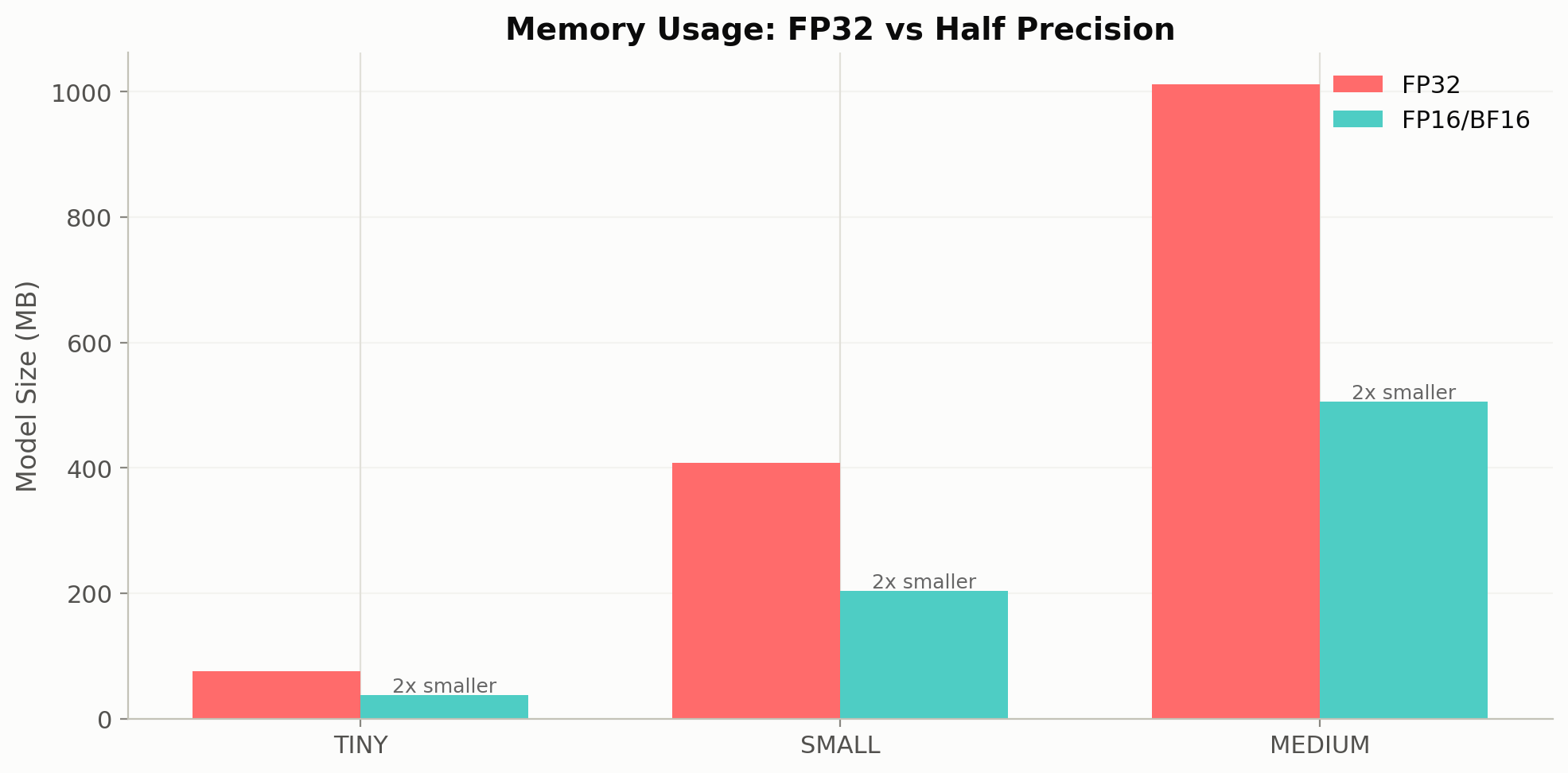
Half precision halves the memory for model weights and activations. This means you can either: - Double your batch size (more throughput) - Train a larger model (more capability) - Use longer sequences (more context)

Show plotting code
from ai_playground.models import TransformerConfig

configs = [
    ('TINY (256d, 6L)', TransformerConfig(dim=256, n_layers=6, n_heads=8, n_kv_heads=4)),
    ('SMALL (768d, 12L)', TransformerConfig(dim=768, n_layers=12, n_heads=12, n_kv_heads=4)),
    ('MEDIUM (1024d, 24L)', TransformerConfig(dim=1024, n_layers=24, n_heads=16, n_kv_heads=4)),
]

print(f'{"Model":<22} {"Params":>10} {"FP32 (MB)":>12} {"FP16/BF16 (MB)":>16} {"Savings":>10}')
print('=' * 75)

sizes_fp32 = []
sizes_fp16 = []
labels = []

for name, cfg in configs:
    n_params = cfg.num_params()
    fp32_mb = n_params * 4 / 1024**2
    fp16_mb = n_params * 2 / 1024**2
    print(f'{name:<22} {n_params/1e6:>8.1f}M {fp32_mb:>10.1f}MB {fp16_mb:>14.1f}MB {fp32_mb/fp16_mb:>8.1f}x')
    sizes_fp32.append(fp32_mb)
    sizes_fp16.append(fp16_mb)
    labels.append(name.split('(')[0].strip())

# Visualize
fig, ax = plt.subplots(figsize=(10, 5))
x = np.arange(len(labels))
w = 0.35
ax.bar(x - w/2, sizes_fp32, w, label='FP32', color='#FF6B6B')
ax.bar(x + w/2, sizes_fp16, w, label='FP16/BF16', color='#4ECDC4')
ax.set_xticks(x)
ax.set_xticklabels(labels, fontsize=11)
ax.set_ylabel('Model Size (MB)', fontsize=12)
ax.set_title('Memory Usage: FP32 vs Half Precision', fontsize=14, fontweight='bold')
ax.legend(fontsize=11)
ax.grid(True, alpha=0.3, axis='y')

for i, (f32, f16) in enumerate(zip(sizes_fp32, sizes_fp16)):
    ax.text(i + w/2, f16 + 5, f'2x smaller', ha='center', fontsize=9, color='#666')

plt.tight_layout()
plt.show()

print('\nNote: training memory is ~4x model size (weights + gradients + optimizer state).')
print('Mixed precision reduces weights and activations, but optimizer state stays FP32.')
Model                      Params    FP32 (MB)   FP16/BF16 (MB)    Savings
===========================================================================
TINY (256d, 6L)            19.9M       76.0MB           38.0MB      2.0x
SMALL (768d, 12L)         107.0M      408.1MB          204.0MB      2.0x
MEDIUM (1024d, 24L)       265.3M     1012.2MB          506.1MB      2.0x


Note: training memory is ~4x model size (weights + gradients + optimizer state).
Mixed precision reduces weights and activations, but optimizer state stays FP32.

5. Training Comparison: FP32 vs BF16

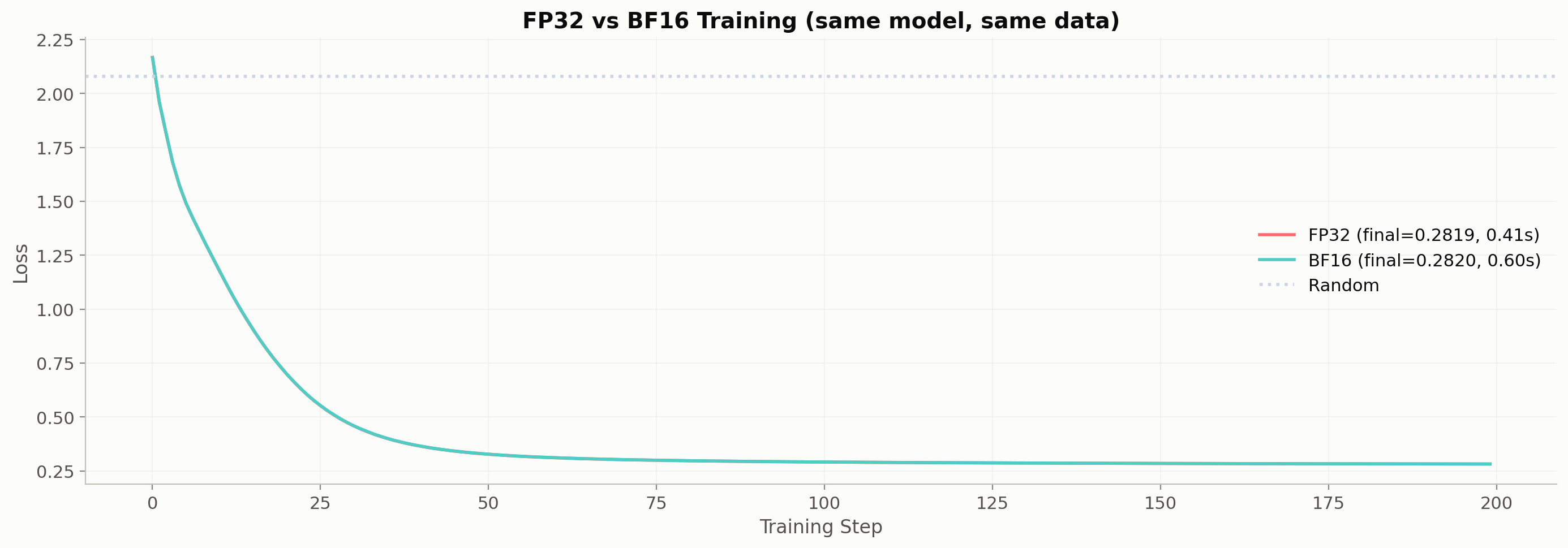
Let’s train the same model with both precisions and compare loss curves. On CPU we won’t see a speed difference (no tensor cores), but we can verify that BF16 achieves the same final loss.

Show plotting code
from ai_playground.models import Transformer, TransformerConfig

VOCAB = ['<pad>', 'the', 'cat', 'dog', 'sat', 'ran', 'on', 'mat']
tok2id = {t: i for i, t in enumerate(VOCAB)}
sentences = ['the cat sat on the mat', 'the dog ran on the mat',
             'the cat ran on the mat', 'the dog sat on the mat']
all_tok = [[tok2id[w] for w in s.split()] for s in sentences]
train_x = torch.tensor([t[:-1] for t in all_tok])
train_y = torch.tensor([t[1:] for t in all_tok])

def train_precision(dtype_name, n_steps=200, seed=42):
    """Train with a specific precision and return loss history + timing."""
    torch.manual_seed(seed)
    cfg = TransformerConfig(
        vocab_size=len(VOCAB), dim=32, n_layers=2, n_heads=4,
        n_kv_heads=2, max_seq_len=16, ffn_dim_multiplier=2.0,
    )
    model = Transformer(cfg)
    optimizer = torch.optim.AdamW(model.parameters(), lr=3e-3)
    
    dtype_map = {'float32': torch.float32, 'bfloat16': torch.bfloat16}
    amp_dtype = dtype_map[dtype_name]
    use_amp = dtype_name != 'float32'
    
    losses = []
    model.train()
    import time
    t0 = time.perf_counter()
    
    for step in range(n_steps):
        with torch.amp.autocast('cpu', dtype=amp_dtype, enabled=use_amp):
            logits = model(train_x)
            loss = F.cross_entropy(logits.view(-1, len(VOCAB)), train_y.view(-1))
        
        optimizer.zero_grad()
        loss.backward()
        optimizer.step()
        losses.append(loss.item())
    
    elapsed = time.perf_counter() - t0
    return losses, elapsed

# Train both
losses_fp32, time_fp32 = train_precision('float32')
losses_bf16, time_bf16 = train_precision('bfloat16')

fig, ax = plt.subplots(figsize=(14, 5))
ax.plot(losses_fp32, label=f'FP32 (final={losses_fp32[-1]:.4f}, {time_fp32:.2f}s)', color='#FF6B6B', linewidth=2)
ax.plot(losses_bf16, label=f'BF16 (final={losses_bf16[-1]:.4f}, {time_bf16:.2f}s)', color='#4ECDC4', linewidth=2)
ax.axhline(y=np.log(len(VOCAB)), color='#CBD5E1', linestyle=':', label='Random')
ax.set_xlabel('Training Step', fontsize=12)
ax.set_ylabel('Loss', fontsize=12)
ax.set_title('FP32 vs BF16 Training (same model, same data)', fontsize=14, fontweight='bold')
ax.legend(fontsize=11)
ax.grid(True, alpha=0.3)

plt.tight_layout()
plt.show()

print(f'Final loss — FP32: {losses_fp32[-1]:.4f}, BF16: {losses_bf16[-1]:.4f}')
print(f'Difference: {abs(losses_fp32[-1] - losses_bf16[-1]):.4f} (should be very small)')
print(f'\nOn GPU with tensor cores, BF16 would be ~2x faster.')
print(f'On CPU there\'s no speedup (no tensor cores), but the results match.')

Final loss — FP32: 0.2819, BF16: 0.2820
Difference: 0.0001 (should be very small)

On GPU with tensor cores, BF16 would be ~2x faster.
On CPU there's no speedup (no tensor cores), but the results match.

🏗️ Project milestone M6 — measure your precision speedup

On a GPU (this chapter’s Colab badge gives you a T4): train your model 200 steps in fp32 and again under bf16 autocast; record tokens/sec for both plus the loss gap in metrics.json['m6_precision']. On CPU: record the fp32 baseline and note the expected ~2x — the milestone is the measurement discipline, not the hardware.

Accept when: metrics.json has both numbers (or baseline + note) and your adopted precision is recorded in config.json. Part of The Project: Serve Your Own LLM.

Session S2.5 — record the adopted precision as "precision": "bf16" (or "fp32") in config.json; verify: uv run pytest tests/milestones/test_m06_precision.py.

Key Takeaways

  1. Mixed precision = 2x speedup on modern GPUs with near-zero quality loss.
  2. BF16 > FP16 for training because it has FP32’s range (no loss scaling needed). Use BF16 when your GPU supports it (A100+, Apple M-series).
  3. “Mixed” means compute in half precision, accumulate in full precision. PyTorch’s autocast and GradScaler handle this transparently.
  4. Memory savings are ~2x for model weights and activations — enables larger batches or bigger models.
  5. The trainer (trainer.py:69-76) supports FP32, FP16 (with GradScaler), and BF16 via the dtype config field.

References

Next: 03_gradient_accumulation.ipynb — simulate large batches on small hardware